
Information on what the SBI Tool is, how to use it and how to request changes.
Download
INFO6: Small Business Identification (SBI) Tool [DOCX 243 kB]
Contents
- What is the Payment Times SBI Tool
- When to use the SBI Tool
- How does the SBI Tool work
- How to use the tool
- Updating and correcting the SBI Tool
- Opting out and opting back into the SBI Tool
- Further information
What is the Payment Times SBI Tool
The Payment Times Small Business Identification (SBI) Tool is the official tool that can be used to identify whether a business is a small business for the purposes of payment times reporting.
The SBI Tool contains a database of Australian Business Numbers (ABNs) that are:
- medium and large sized businesses
- entities with revenue A$10 million or more in a single financial year
- entities part of a corporate group with A$10 million or more consolidated revenue in a single financial year
- government entities, and
- small businesses that have opted out of being identified as a small business in the SBI Tool.
The SBI Tool is available via the Payment Times Reporting Portal and is updated annually in January and on an as-needed basis for any corrections. For further information see Updating and Correcting the SBI Tool.
When to use the SBI Tool
The SBI Tool can be accessed at any time and used in any manner that assists reporting entities in meeting their reporting obligations under the Payment Times Reporting Act 2020 (the Act) and in accordance with the
Terms of Use. Improper use may result in your access to the SBI Tool being restricted.
Mandatory Use: You must use the SBI Tool after each reporting period and before submitting your payment times report.
You must use the SBI Tool to create your Small Business Trade Credit Payments Dataset (SBTCP Dataset) that is used to prepare your payment times report (see Guidance Materials Step 3: Preparing Datasets).
Failing to use the SBI Tool to create your SBTCP dataset may result in compliance action, including civil penalties for submission of false or misleading payment times reports.
How does the SBI Tool work
The SBI Tool works by elimination.
When a user uploads a list of supplier ABNs into the SBI Tool, the tool compares the uploaded ABNs against the ABNs in the database.
Suppliers whose ABNs do not match the records in the database will be classified as a “Small business for payment times reporting”. Suppliers whose ABNs match the records in the database will be classified as “Not a small business for payment times reporting”.
What is a medium or large business?
For the purpose of the SBI Tool database, an entity will be considered a medium or large business if:
- the entity’s revenue was A$10 million or more in a single financial year for the entity, or
- the entity is a parent, subsidiary or controlled entity within a corporate group that has A$10 million or more in consolidated annual revenue.
What is a government entity?
For the purpose of the SBI Tool database, an entity will be considered a government entity if it is a Commonwealth, State or Local government entity as per its “ Entity Type” classification on the Australian Business Register (ABR).
The output of the SBI Tool will not specifically identify an ABN as a government entity. Rather, a government entity is identified as “Not a small business for payment times reporting”. This enables payments to government suppliers to be excluded from a reporting entity’s SBTCP Dataset when preparing a payment times report.
You can identify whether your supplier is a government entity via the ABN Lookup tool online or the datasets the ABR publishes on its website.
How to use the tool
The SBI Tool is only accessible through the Payment Times Reporting Portal (Portal). If you do not have access to the Portal, please contact support@paymenttimes.gov.au.
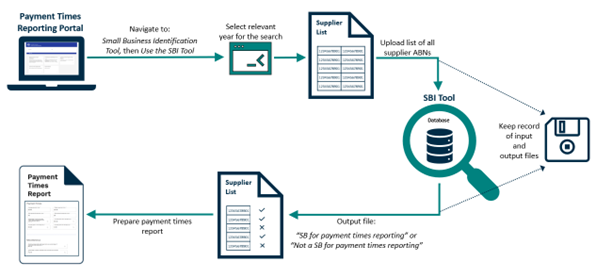
- Log in to the Portal,
- Select the ‘Small Business Identification Tool’ tile, then select ‘Use the SBI Tool’ tile,
- Select the relevant calendar year for the search (see below),
- Upload a .CSV or .TXT file (or paste) your suppliers’ ABNs,
- The SBI Tool will generate a .CSV output file, identifying which ABNs are small businesses for payment times reporting and those that are not,
- Recordkeeping: You must keep both the input file submitted to the SBI Tool (or the list of pasted ABNs) and the output file you receive.
Selecting the correct year
When running the SBI Tool for a particular reporting period, users must select the calendar year in which the relevant reporting period ended. For reporting entities using a 52‑53 week financial year, users should select the calendar year in which the reporting period would ordinarily end (see example 3).
The above process should be followed even if you are revising a previously submitted report or lodging an outstanding report for a historical reporting period (see example 4).
Note: Prior to calendar year 2024, the SBI Tool provided point-in-time classification. When running the SBI Tool for reporting periods ending prior to 2024, users must select the 2024 calendar year.
Example 1 – Conventional reporting period A reporting entity is preparing a report for the reporting period 1 January 2025 – 30 June 2025. When running the SBI Tool, it must select the 2025 calendar year as this is the year in which the relevant reporting period ended. Example 2 – Unconventional reporting period A reporting entity is preparing a report for the reporting period 1 October 2024 - 31 March 2025. When running the SBI Tool, it must select the 2025 calendar year as this is the year in which the relevant reporting period ended. Example 3 – 52-53 week financial years A reporting entity with an ordinary financial year end of 31 December has lengthened its financial year under section 323D of the Corporations Act and is preparing a report for the reporting period 1 July 2025 - 5 January 2026. When running the SBI Tool, it must select the 2025 calendar year as this is the year in which the relevant reporting period would have ordinarily ended. Example 4 – Revising a payment times report for a historical reporting period It is February 2027, and a reporting entity wants to revise a report that it has previously lodged for the reporting period 1 January 2025 - 30 June 2025. When running the SBI Tool, it must select the 2025 calendar year as this is the year in which the relevant reporting period ended. |
Keeping SBI Tool records
You must keep copies of both the input file submitted to the SBI Tool and the .CSV output file you receive for at least 7 years. Failing to keep records, as required by the Act, may result in civil penalty action.
Updating and correcting the SBI Tool
The SBI Tool is updated in January each year, with the latest data available to the Regulator. The data identifies control relationships between entities to ensure subsidiaries of medium and large businesses are correctly classified.
The Regulator may update the SBI Tool throughout the year if evidence shows an entity’s classification is incorrect.
Several factors may impact on the accuracy and reliability of SBI Tool data. For example, businesses being non-compliant with statutory reporting obligations or an absence of readily available data particularly for newly established entities or organisation structures.
Note: updates to the SBI Tool may result in changes to the status of whether a particular entity is a small business for payment times reporting throughout the year.
Changing an entity’s classification from a small business to not a small business
The Regulator can update the SBI Tool to reclassify an entity as “Not a small business for payment times reporting” if there is evidence that shows that the entity is a medium or large business or a government entity.
Changing a supplier’s classification
If you believe the SBI Tool output file incorrectly identifies your supplier as “Small business for payment times reporting”, you can submit a ‘Notification to Correct the SBI Tool’ via the Portal and provide one of the following:
- statutory declaration affirming that the supplier was paid A$10 million or more within the supplier’s financial year, or
- evidence showing the supplier was paid A$10 million or more within the supplier’s financial year. This evidence should clearly identify the supplier’s financial year, which may be established through documentation or written confirmation from the supplier, such as an email, or
- evidence showing that the supplier is a parent, subsidiary or controlled entity within a corporate group that has A$10 million or more in consolidated annual revenue. For example, the supplier’s parent being listed as a reporting entity in the Payment Times Reports Register or financial statements for the corporate group showing consolidated revenue above the threshold.
If you are unable to provide the required evidence, you can ask the supplier to contact the Regulator directly to request a correction to their classification (as per below).
Changing your own classification
If you believe the SBI Tool incorrectly identifies your entity as a small business, you can contact the Regulator at support@paymenttimes.gov.au. In your email, please:
- provide your entity’s ABN and registered business name,
- provide your first name, surname, and your role/relationship to your entity,
- affirm that your entity is not a small business for payment times reporting, and
- affirm that you are authorised to request the classification update on the SBI Tool on behalf of your entity.
Changing an entity’s classification from not a small business to a small business
The Regulator can update the SBI Tool to reclassify an entity as a “Small business for payment times reporting” if there is evidence showing that it is not a medium or large business or a government entity.
Changing a supplier’s classification
If you are a reporting entity and believe the SBI Tool output file incorrectly identifies your supplier as “Not a small business for payment times reporting”, you can request your supplier to contact the Regulator at support@paymenttimes.gov.au and provide relevant evidence showing it is a small business. Please refer to Changing your own classification, below.
Changing your own classification
If you are a small business and believe the SBI Tool incorrectly identifies your entity as a medium or large business, you can contact the Regulator at support@paymenttimes.gov.au. In your email, please:
- provide your entity’s ABN and registered business name,
- provide your first name, surname, and your role/relationship to your entity,
- affirm that you are authorised to request the classification update on the SBI Tool on behalf of your entity, and
- include documentary evidence that your entity’s annual revenue for its most recent financial year was less than A$10 million and that your entity does not belong to a corporate group with consolidated annual revenue of A$10 million or more.
Next Steps
The Regulator is committed to updating the SBI Tool within 28 calendar days of appropriate documentary evidence being provided.
Where a reporting entity has identified an error and seeks to have the SBI tool updated, it may:
- wait for the SBI Tool to be updated then re-run the tool for the relevant period, or
- use the SBI Tool output file with the error uncorrected to prepare its payment times report. It may lodge a revised report once the SBI Tool has been updated if it wishes to do so.
Waiting for the SBI Tool to be updated does not excuse a reporting entity from the obligation to submit a payment times report by the statutory due date.
Opting out and opting back into the SBI Tool
Small business suppliers may choose to opt out of the SBI Tool so that they are identified as “Not a small business for payment times reporting.”
To opt out of the SBI Tool, small businesses must register on the Portal. Detailed information and guidance (including demonstration videos) on getting set up and accessing the Portal can be found in the
How and when to report section on our website.
Once registered and logged into the Portal, small businesses can opt out of the SBI Tool by navigating to the Small Business Identification Tool tile and selecting Opt Out of / Back into the SBI Tool. If a small business subsequently wants to opt back into the SBI Tool, it can do so at any time via the same process.
Note: only entities that are identified as small businesses on the SBI Tool will have the ability to
Opt Out of / Back into the SBI Tool.
Further information
For more information, please refer to the Guidance materials and information sheets available in the Guidance section of the Payment Times Reporting Regulator’s website.
Document history
This information sheet version was published in December 2025 based on the Payment Times Reporting Act 2020 and Payment Times Reporting Rules 2024 as of that date.
| Date published | Status | Details of change |
| 12/12/2025 | Active | Updated for clarity on use and correction requirements to the SBI Tool. |
| 16/12/2024 | Superseded | Updated to reflect IT upgrades to the SBI Tool and output file. |
| 11/12/2023 | Superseded | Updated to reflect changes to the way entities can correct the SBI Tool. |
| 28/10/2022 | Superseded | Original version |